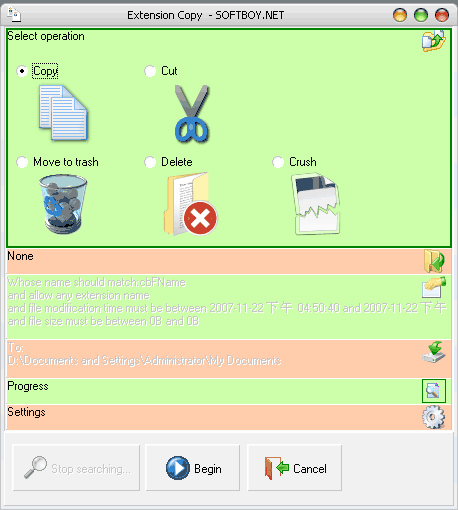
Extension Copy
is a powerful tool designed to help you copy, delete, cut or crush the files with specific name, size and modification time.
This tool supports filename masks, so it allows you to
manage the file names and types in which you're interested.
With extension copy, you can copy or cut interested files,
or delete them in one action. There are 3 deleting-modes,
move to trash, delete and crush. If you have confidential documents bank documents, records of casino winnings, etc. and want these documents to be erased forever, you can select crush operation to delete these files. Not like windows copy and paste, extension copy only copy interested files and save your time and disk space . Not like windows copy and paste, extension copy only
copy interested files and save your time and disk space.
This tool also supports clipboard
monitor,
your copy operation will be faster and efficient. With it
you can search interested files and batch copy them
quickly and easily.
Download and start
15 days free full functional trail.
Uninstaller is as easier as installer.

Features:
Batch file copy, cut or
delete. (Copy multiple files in one action.)
Supports Filename Masks. (Wildcard characters include
'?' and '*')
Monitors
the clipboard. (Only monitor the file system.)
Supports standard IDE/ATA/SCSI hard drives, removable
disk, remote network disk.
Copy only the file names and types in which you're
interested.
Copy only files of a certain age.
Copy only files of a certain size.
Absolutely delete unwanted secret files.
Allow copy all wanted files to a single folder.
Allow only copy needed files but keep the directory
structure.
|

 |
|
| |
|
|
|
|
|
|
| Version: |
3.0 |
| Setup
file size: |
0.55MB |
| OS: |
Windows
95/98/Me/NT/2000/XP/2003/Vista/Windows7 |
| Uninstaller
included: |
Yes |
| Expires
after: |
15 days |
| Limitation
of trial version: |
Without any limitation. |
| Screenshot: |
View
screen shots |
| Video
demo |
View |
| Download: |
Download
the free trial version link 1 (3.0)
Download
the free trial version
link 2 (2.0) |
| Price: |
$29.95 [SALES 39.95] |
| Purchase: |
The easiest and
fastest way to order Extension Copy is online, using credit cards. The ordering pages
are on a secure web site that encrypts all
transmitted credit card data according to the
secure HTTP protocol. As soon as your order has
been processed with not a free email, your registration code is emailed
to you right away! No waiting! |
|
|
|
|
|
|
| License Type |
|
Single
• One private person can install and run
Extension Copy on one computer.
• One organization can install and run Extension
Copy on one computer. Program may be used by different
persons but not simultaneously.
Multi-User
• Entitles one single organization to install
and run Extension Copy on the specified amount of
computers.
• Pricing is per computer.
Your order will be fulfilled by
RegSoft or Paypal. |
|
|
|
|
|
|
|
| Example |
| Three
steps to copy all picture files in driver C: to D:\mypic |
| 1.
Select Driver C: in Windows Explorer and Press
Ctrl+C; |
2.
Extension Copy will auto-popup. Input files name
mask in "Filename Mask", such as:
*.jpg/*.png/*.gif/*.bmp/*.ico/*.tif |
| 3.
Select the destination fodler D:\mypic
and click "Begin"; all the wanted
picture file will be copied. |
|
|
| FAQS |
| 1.
Is tech support free? |
|
Yes! |
| 2.
What happens after ordering? |
|
You will receive an email confirming your order
shortly after sending the online order form. Then,
if your order is authorized by Fraud Management
Filters System, within 1 hours, you will receive a
second email with your registration code and
instructions! |
| 3.
I have paid but didn't get registration key, what
to do? |
|
Please email us at support@softboy.net
Please include your name, address, email address,
and order confirmation number (if you have it). We
will be happy to help you. |
| 4.
Is your online order form secure? |
Yes, it is 100% secure. provide by PayPal.
Use secure HTTP protocol to transmit data.
http://www.softboy.net/extensioncopy/buynow/ |
| 5.
Is Upgrading free? |
|
Yes, total free. |
| 6.
How to Uninstall this software? |
Click the uninstaller from Start\Program
File\Extension Copy\Uninstall
or Control Panel\Add Remove Program. |
| 7.
Is this software safe? |
|
Yes, the software does not contain any spyware,
adware or malware. |
| 8.
What's the different between "Delete"
and "Crush"? |
|
Some software can restore the deleted file. But
sometimes, you want your secured file to be
deleted absolutely. Choose "Crush" will
delete the file absolutely and it can not be
restored. Because the file is filled with random
data before deleting. |
| 9.
How to use Filename Masks? |
Filename masks are comprised of patterns of
characters, with multiple sets of masks separated
by a '/'. Wildcard characters include '?' and '*',
which match either one instance or multiple
instances of any character (respectively). Any
other (non-wildcard) character matches itself.
Here are a few examples of
wildcard filename masks:
*.jpg - This mask uses the
asterisk ('*') character to include any files with
a ".jpg" extension in their names.
*.bmp/*gif/*jpg - This is a
compound mask, with separate entries separated by
'/'. This mask will match any ".bmp",
".gif", or ".jpg" files it
encounters.
a?b*.* - This mask uses the '?'
and '*' to include any files but the first
character of the filename must be 'a' and the
third one should be 'b'. |
| 10.
How to exclude some file types? |
|
After searching, you can uncheck unwanted file
types in the "File filtering" panel. |
| 11.
When I copy some complex folders, it need a long
time to search the files in it. can I skip this
step? |
|
Yes, you can. But this will cause the software can
not estimate the remaining time. |
| 12.What
is crush? |
|
If you want to securely delete a
file or folder and to be sure that nobody
with any tool could be able to recover
this file or folder then use Unrecoverable
Delete. Deleting files and emptying
Windows Recycle Bin does not mean that
these files are gone forever. They are
still on your Hard Disk Drive or other
storage but marked as deleted. Anybody
with a tool available, free or commercial,
could recover deleted data very easily.
Unrecoverable delete tool
"Crush" of Extension Copy makes
this impossible even if you try to do that
with the most advanced and expensive tool
on the market. Deleting files in Windows
means that they are marked as deleted and
the space they allocated is free to use.
This is because if Windows has to
physically erase all deleted files it will
take time and will slow down your
computer. |
|
|
|
|
|
|
|
|
|
|
| Contact |
if
you are not satisfied with FAQs, please do not
hesitate to write us at support@softboy.net
about everything concerning our product.
The support is very important for us, because we
wish to provide you with the best solutions for
your needs. We are very grateful to you because of
your opinion about our product - if it meets your
needs, if it's comfortable enough for you to use. |
|
|
|
|
|
|
|
|
|
|
|
|
|
|
|
|
|
|
.. |
|