Key Transformation - Customize keyboard layout; Change key on keyboard; On screen keyboard.
Key Transformation can customize your keyboard layout, change any key on the keyboard into other keys. Its on-screen-keyboard ( soft keyboard ) is very easy to use.
Want the F1 key to type B? Want the D key to type f? Want the Shift+Enter key to press Table? Want Shift+1 to type a Sentence? Want an exchange between Ctrl+C and Ctrl+V?
Key Transformation can do these easily.
The program allows you to redefine system keys, such as , Ctrl, Alt, Shift, Table, and Win keys. You can also disable desired key.
It can extend your keyboard function. By using it, the input method of special language can be accomplished easily.
Now you can set your own keyboard layout and enjoy easier, faster and less painful typing.
Price :$44.95

Shipping Info:
1. Registration Code will be sent by Email
2. Download Insurance Service (Optional)
3. Backup CD(Optional)
4. 100% Purchase Secure.
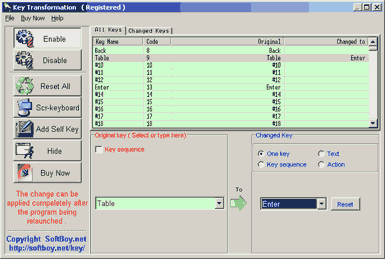
Key Transformation has several advantages. The advantages include:
?Key Transformation can be used as an easy fix to correct firmware errors.
?Frequently used keys can be added to the keyboard by modifying the map. Keys that aren't often used (for example, right CTRL key) can be mapped to Disabled or exchanged for other keys.
?Key locations can be altered easily. Users can easily customize the location of frequently used keys for their benefit.
?Once the key locations is altered, a system reboot is not required to activate it.
?The new mappings only apply to current user. These mappings can be set to work differently depending on the current user.
?Key transformation supports Windows 95/98/NT/2000/XP/2003 .
?Key transformation Lets you type using your mouse.
?Key transformation defines an action as what gets done by a set of commands to perform a task, such as "open a web page", "execute a program", "type text" and others.
Buy Key Transformation Only $44.95
Download Free Trial Version of Key Transformation.
Size:1.3 MB. Download and unzip the packaged installer with password 'abc'.
Key Transformation free download, Key Transformation offical site, key transformation, key2key
Comments:
Hi,
This is Kent of SharewareOnSale. I am writing once again in hopes to get in touch with someone from your company who handles the promotions and partnerships.
In this regard, we would like to offer you the opportunity to advertise your software and services, increase your brand awareness, and grow your newsletter list -- for FREE! We have over 500,000 members who are ready to download and use your Windows software and services -- and you don't have to pay us anything!
We are interested in promoting your product, Key Transformation.
If you are the appropriate person to discuss this with, please reply to this email. If not, who is the appropriate person to speak with?
Take care,
Kent
-By SharewareOnSale on December 16, 2020, 4:19 pm
Hi I am getting the error when I start up my standalone computer with windows 11
I have to start the keytransformation manually. I used to load automatically but now it doesn't.
How do I fix this and is there an update to the software?
It's a great program and it speeds up my voluntary work immensely.
Cheers Bryan
-By Bryan Butler on April 5, 2026, 3:27 pm