On Screen Keyboard - Customize the on screen keyboars color, layout, size and all your requirement.
Price :$34.95

Shipping Info:
1. Registration Code will be sent by Email
2. Download Insurance Service (Optional)
3. Backup CD(Optional)
4. 100% Purchase Secure.
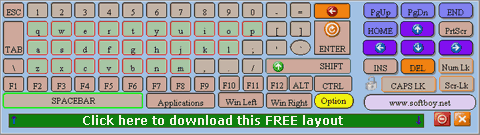
Softboy.net On-screen-keyboard is a virtual keyboard on the screen and allowing you use the mouse pointer to type. Which can be useful if you have mobility impairments, if you are using a tablet PC, or if your keyboard goes down. And it can works well on touch-screen.
This a demo keyboard which includes the main keys on a normal keyboard.
With the keyboard editor tools, you can design your own keyboard which can fulfill your requirement. The editor is easy to use, without any program knowledge you could design an virtual keyboard which will be fit for you.
Now download the demo and design your own on-screen keyboard.
Standard Features:
Simulate the real keyboard. Use it to type with your mouse pointer as if with a regular keyboard.
Allow you to type different language characters.
Show the characters will be actually typed in any language.
Word prediction.
The on-screen keyboard can be shown or hidden, zoomed in or out, locked or floated.
Support hover over keys.
Can be used as windows logon layout.
Support windows 9X/NT/2000/XP/2003/Vista/Windows7.
You can customize the keyboard and the keys on it.
Such as size, shape, background, alpha, location and language of the on-screen keyboard, and also the function, location, appearance, skin and size of its keys.
following is the screen-shot of keyboard which is created by softboy.net on-screen-keyboard.
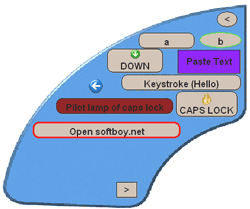
Keyboard and its every key can designed as you wanted.
Download the demo and design your own on-screen-keyboard freely.
Buy On Screen Keyboard Only $34.95
Size:2.44 MB. Download and unzip the packaged installer with password 'abc'.
On Screen Keyboard free download, On Screen Keyboard offical site, osk, on screen keyboard, touch screen
Comments:
dhhghijk
mijlihljm\4\k[kkokjpoip[k
-By aftab on September 6, 2023, 11:04 pm